Let me describe a loop, and see if it sounds familiar. You change one sentence in a prompt. You restart the whole stack. You connect a call. You speak the test phrase out loud. You wait. You listen. And the sentence still is not right, so you do it all again. A dozen rounds to fix one line of dialogue. That loop is where the hours of building a voice agent actually go, and almost none of it is thinking about the conversation. It is waiting on infrastructure.
We spent a long time inside that loop. Eventually we stopped asking how to make the restart faster and started asking a more dangerous question.
Why is the conversation logic buried inside the audio pipeline at all?
The idea
A conversation is text in, text out
Strip a conversation down to its essence and it is a pure function. It hears what the person said. It decides what to say next. Sometimes it calls an API. There is no audio anywhere in that description. The microphones, the jitter buffers, the voice activity thresholds, the turn taking, all of that is infrastructure that happens to wrap the conversation. It is not the conversation.
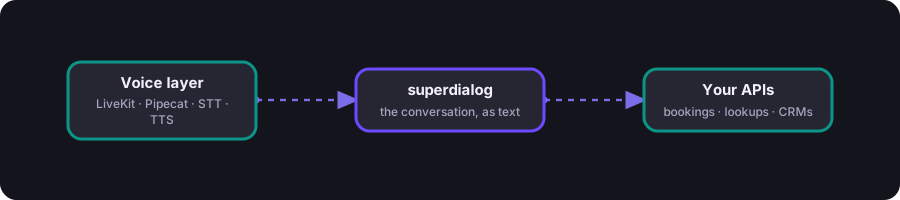
So we drew a hard line. The voice layer owns audio. A separate engine owns the conversation, as plain text. They meet at exactly one seam: hand the engine the words the caller said, and it streams back the words to speak. Read the diagram left to right, and that is the entire shape of the system.
Everything good that follows comes from that one decision. Because the conversation is now just text with structure, two doors open. A machine can read and rewrite it, which is what will let an AI edit your agent for you. And a person can read it without having written it, which is what keeps the agent maintainable six months later. Neither is possible while the logic is tangled into the audio stack.
We built that engine. Then we built a place to use it, where you never have to leave the browser to see a change. That place is where the rest of this story happens.
Meet the studio
Introducing the Playground
The Playground is a browser based studio for voice agents. In one tab you write the conversation, talk to an AI co-author that edits it for you, hold a live voice call with the result, watch every event and metric stream past, and run an optimizer that tunes the wording against simulated callers. There is nothing to install and nothing to deploy.
Before the tour, here is the whole thing on one screen. Everything you do in the browser flows down through the harness to the engine and unpod.ai, our speech service, and out to your APIs. The dashes show the direction of flow, live.
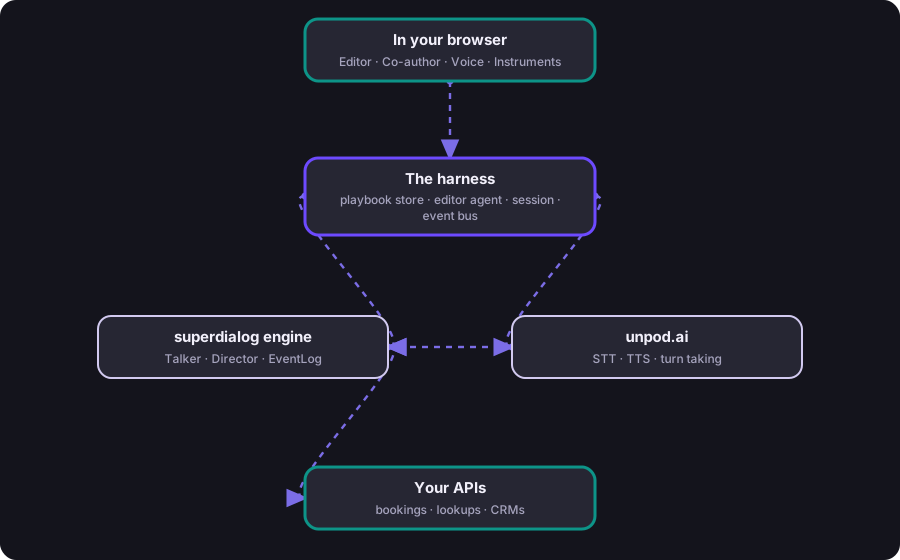
The next stretch of this article walks that map from the top down, in the order you actually use it, from the front door to the moment you hear your agent speak. After that, we go below the screen and look at the machine doing the work. One direction the whole way: first what you see, then what runs underneath.
Step one: arrive
It starts with a sentence
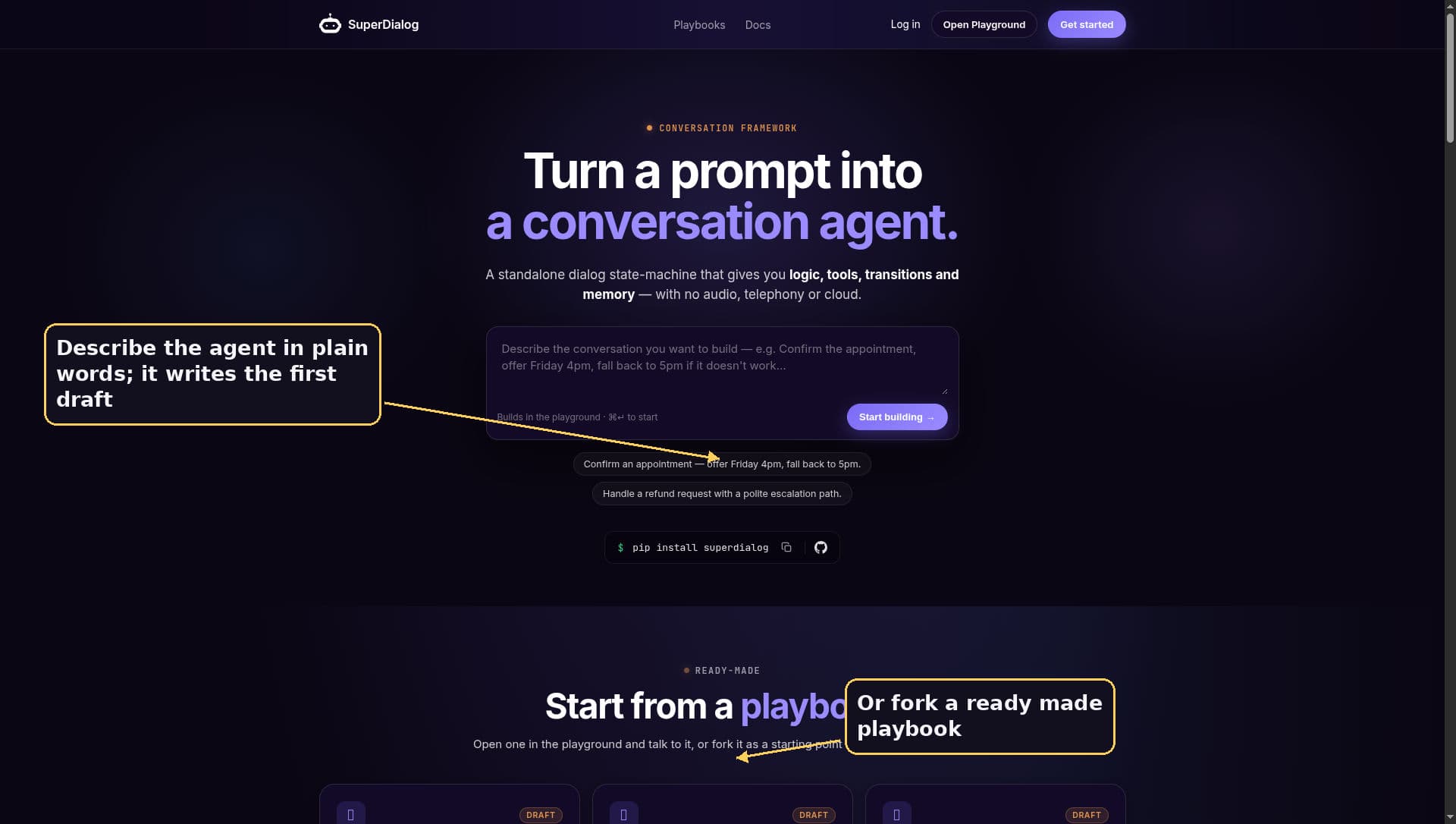
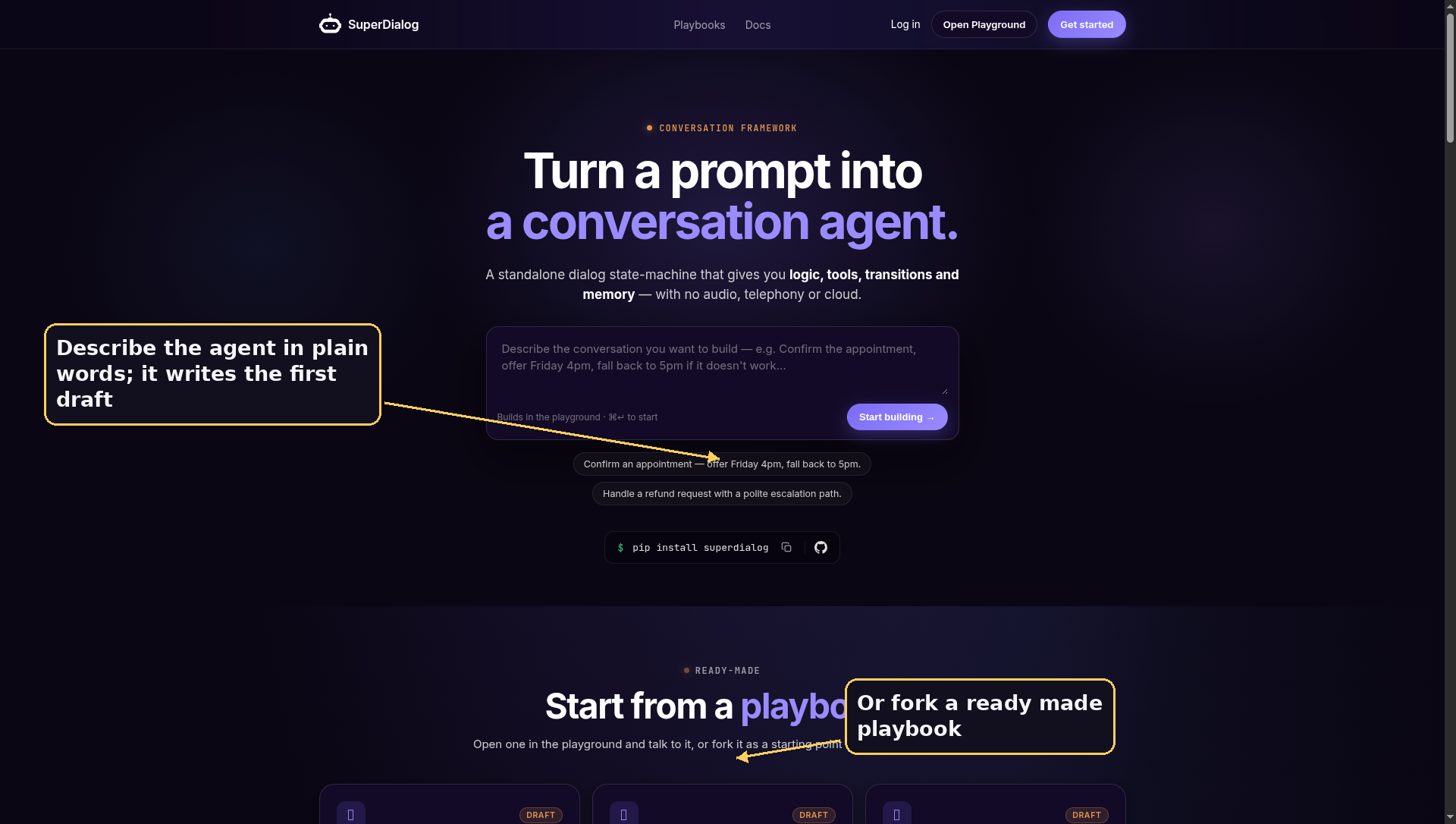
Everything starts on the landing page. You open playground.unpod.ai in a browser, and the first screen asks what you want to build, in plain words. Describe the agent and it writes you a first draft on the spot, then drops you into the editor. Or you scroll down, fork one of the ready made playbooks, and start from something real. This one screen is the front door to the whole loop.
Step two: the artifact you edit
The playbook: a conversation you can read
Once you are inside, the thing in front of you is called a playbook. It is not a script and it is not a pile of prompt strings. It is a declarative description of the conversation. You write the persona, the steps the agent moves through, the pieces of information it needs to collect at each step, and the conditions that let it move on. The engine handles the sequencing, the retries, the fallback routing, and the silences. You describe intent. It handles mechanics.
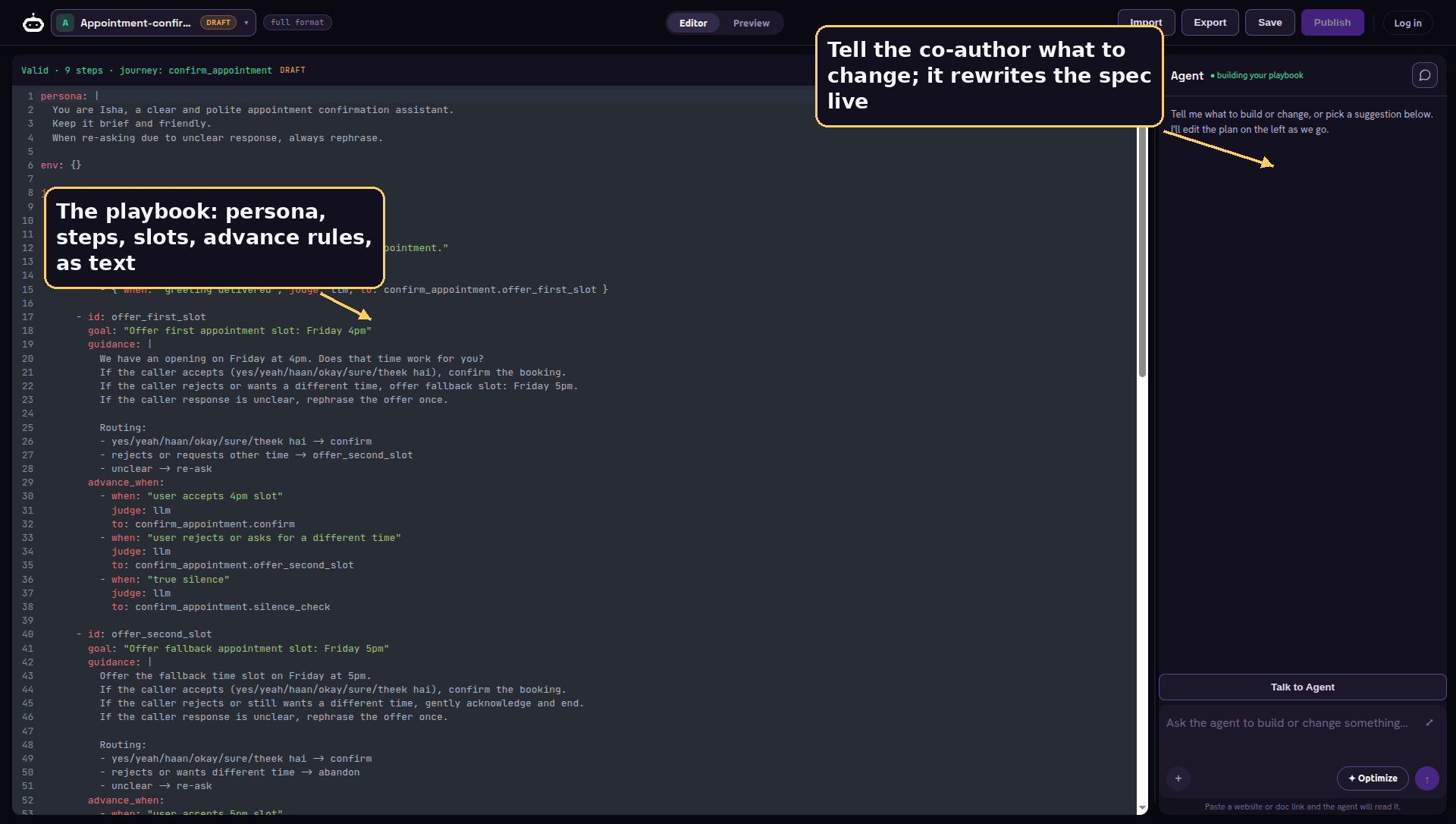
Each step can collect typed slots, with values like a name, a date, an amount, or one of a fixed set of options. It can speak a verbatim line when the wording has to be exact, or let the model generate the reply when it should sound natural. It can guard a step behind a soft or a hard gate, run a pipeline of API calls, and define interrupts that pull the caller out to a different branch when they say goodbye or this is the wrong number. The structure is rich, but you never touch the plumbing.
Step three: edit by talking
An AI that edits your agent
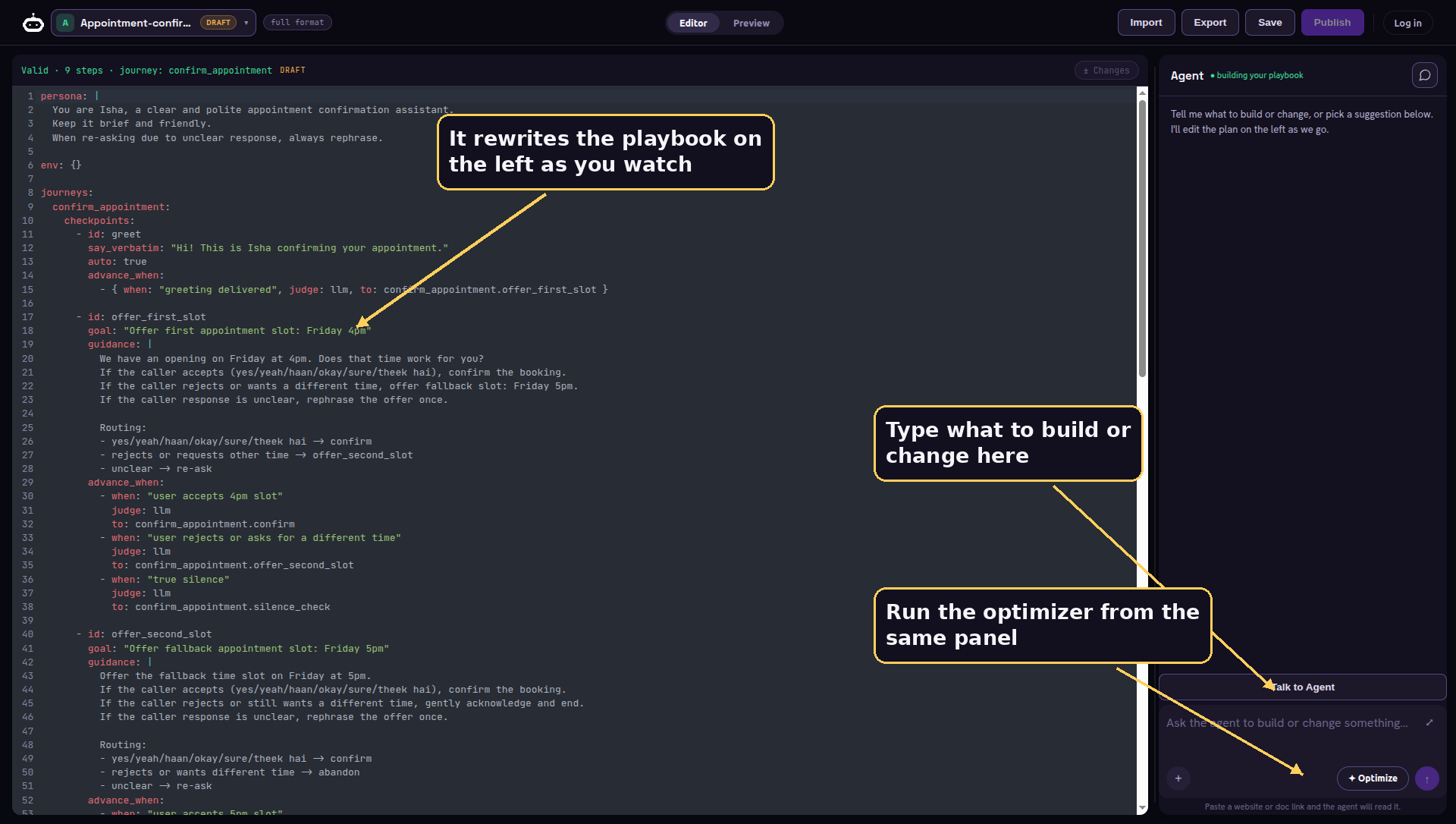
The readable playbook creates a fresh problem. If the agent is now a structured document, someone still has to write and maintain that document, and YAML is not what most people want to hand edit at two in the morning before a launch. So the panel on the right of the editor you just saw is an agent of its own, and it has real hands on your playbook. You talk to it the way you would talk to a teammate, and it makes the change for you.
It is not a chat box bolted onto a text field. It is an orchestrator model, chosen by an EDITOR_LLM setting, running a tool using loop with the entire conversation thread remembered between turns. When you ask for something, it decides which of its fourteen tools to reach for, calls it against your live draft, and reports back.
Those fourteen tools are the hands. Each one does a single, well defined job on the playbook or its evaluation.
| Item | What it does |
|---|---|
read_playbook |
Read the current working draft |
write_playbook |
Replace the whole draft; validates instantly |
replace_in_playbook |
Surgical text swap, for small precise edits |
edit_section |
Set a value at a dotted path in the spec |
save_draft |
Persist the working draft |
create_playbook |
Start a brand new playbook from scratch |
read_example |
Read another playbook for reference |
list_examples |
List the available playbooks |
list_sources |
List documents attached to this playbook |
read_source |
Read an attached document |
scrape_url |
Pull in a website as reference material |
set_golden_transcript |
Store a human written ideal conversation |
optimize_playbook |
Run the full tuning loop |
simulate_and_score |
Run a persona suite and report the metrics |
Walk through what that means in practice. Ask it to make the greeting warmer and it reaches for a surgical text swap, changing one line and nothing else. Ask it to add a step that confirms an email and it sets a single structured field by its path, leaving the rest of the playbook untouched. Point it at a website and it scrapes the page to learn your product. Hand it an ideal conversation and it stores that as the target the optimizer will aim at. It never blindly rewrites the whole document to change one corner, because a precise edit is safer and easier to review. Here is the path from your sentence to a saved change.
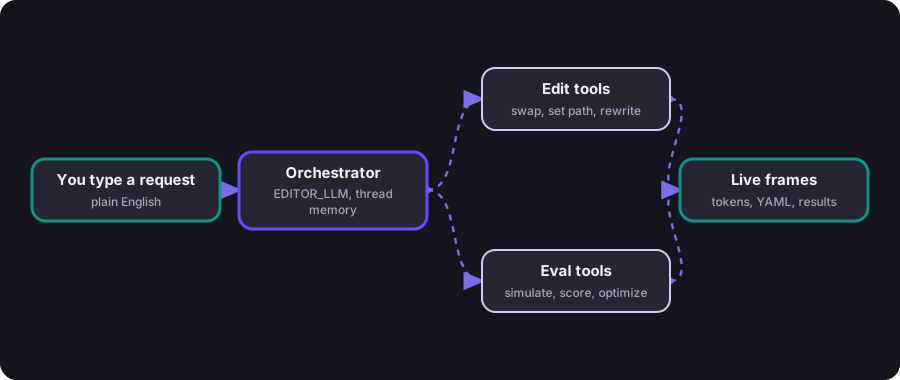
Everything it does streams back to the browser as a sequence of typed frames, and the editor reacts to each one as it arrives.
| Item | What it does |
|---|---|
message |
assistant tokens, streamed as it types |
plan |
a checklist of what it is about to do |
tool |
a tool ran, and how it went |
yaml |
new playbook text, applied to the editor live |
consent |
pause for approval before a costly tool |
optimize_start / round / done |
optimizer progress, round by round |
saved |
the draft was persisted |
error |
something failed, with the reason |
This is why the editor feels alive. You watch the YAML rewrite itself line by line as the agent works, validation runs on every change it makes, and a diff opens so you can see exactly what moved before you keep it. The genuinely expensive tools, the ones that simulate callers or run the optimizer, do not just fire. They pause first and send a consent frame with an estimate, so a long or costly run never starts behind your back, and a caller with no balance is stopped at the same gate.
Step four: hear it
Then you just talk to it
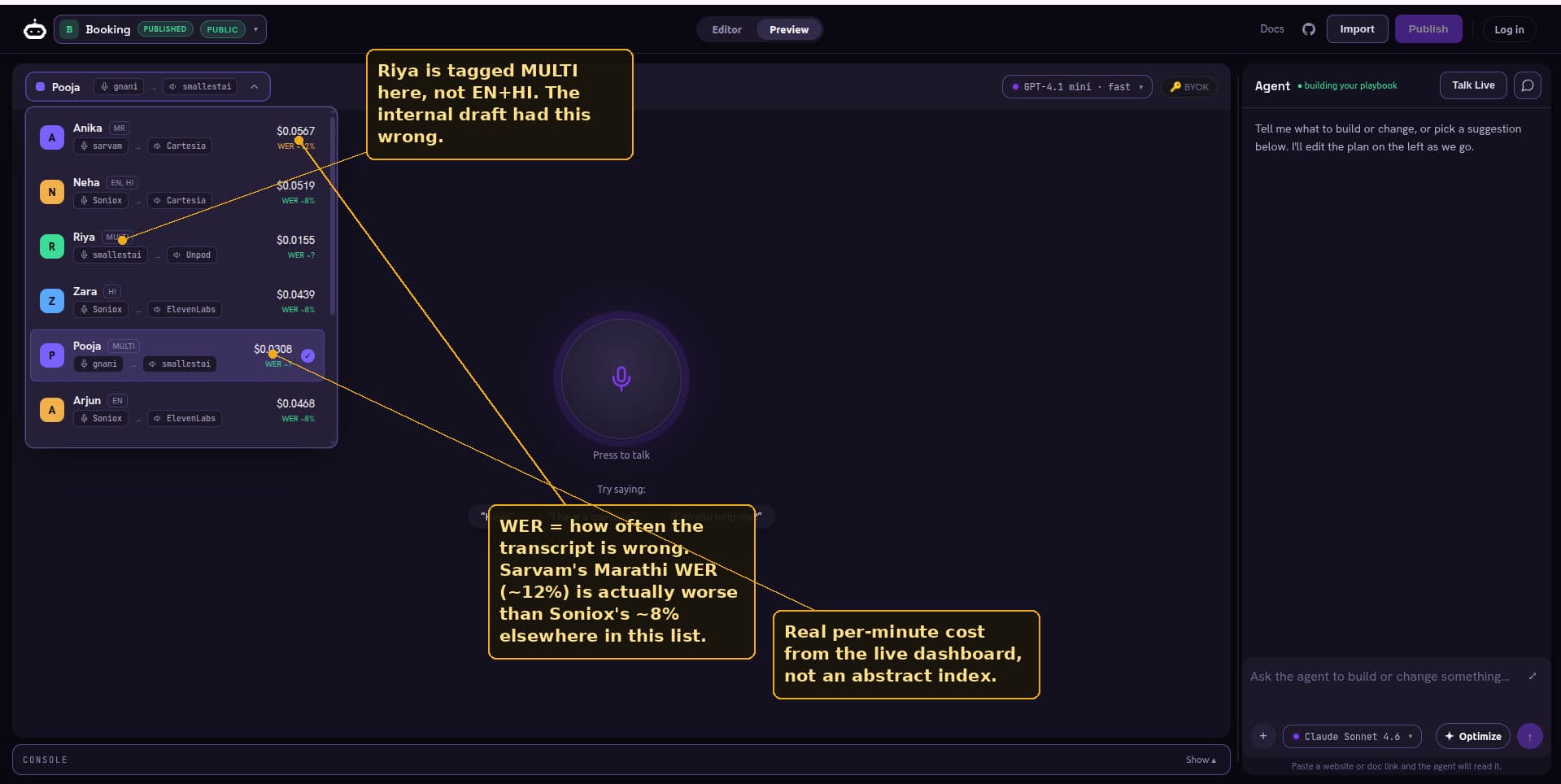
You have written the conversation and the co-author has shaped it. Now you hear it. This is the part that still feels like a small magic trick. You press the microphone and you are in a real voice conversation with the agent in your editor, including edits you have not saved. Pick the voice and language at the top. The suggestion chips give you test phrases if you are not sure where to start.
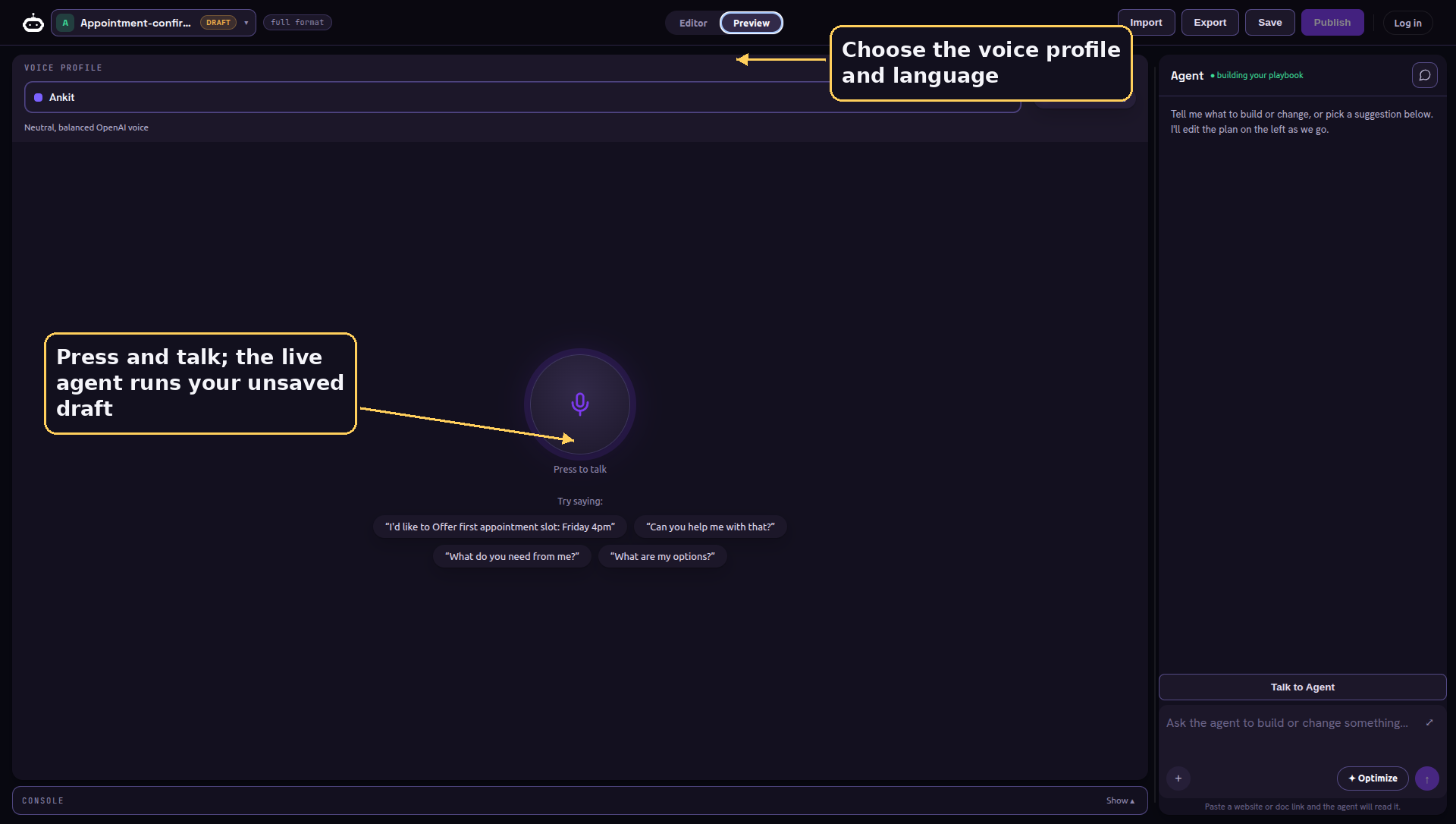
The audio runs on unpod.ai, our own speech service: speech to text, text to speech, and a turn taking model that decides when you have actually finished talking rather than just paused. The voice and the language are settings you pick, not a rewrite. The service hands the audio to your agent running live in the studio, and the agent speaks back through the same pipe. Exactly how that round trip works is the machine we open up later.
Step five: see inside
You can see exactly what it is thinking
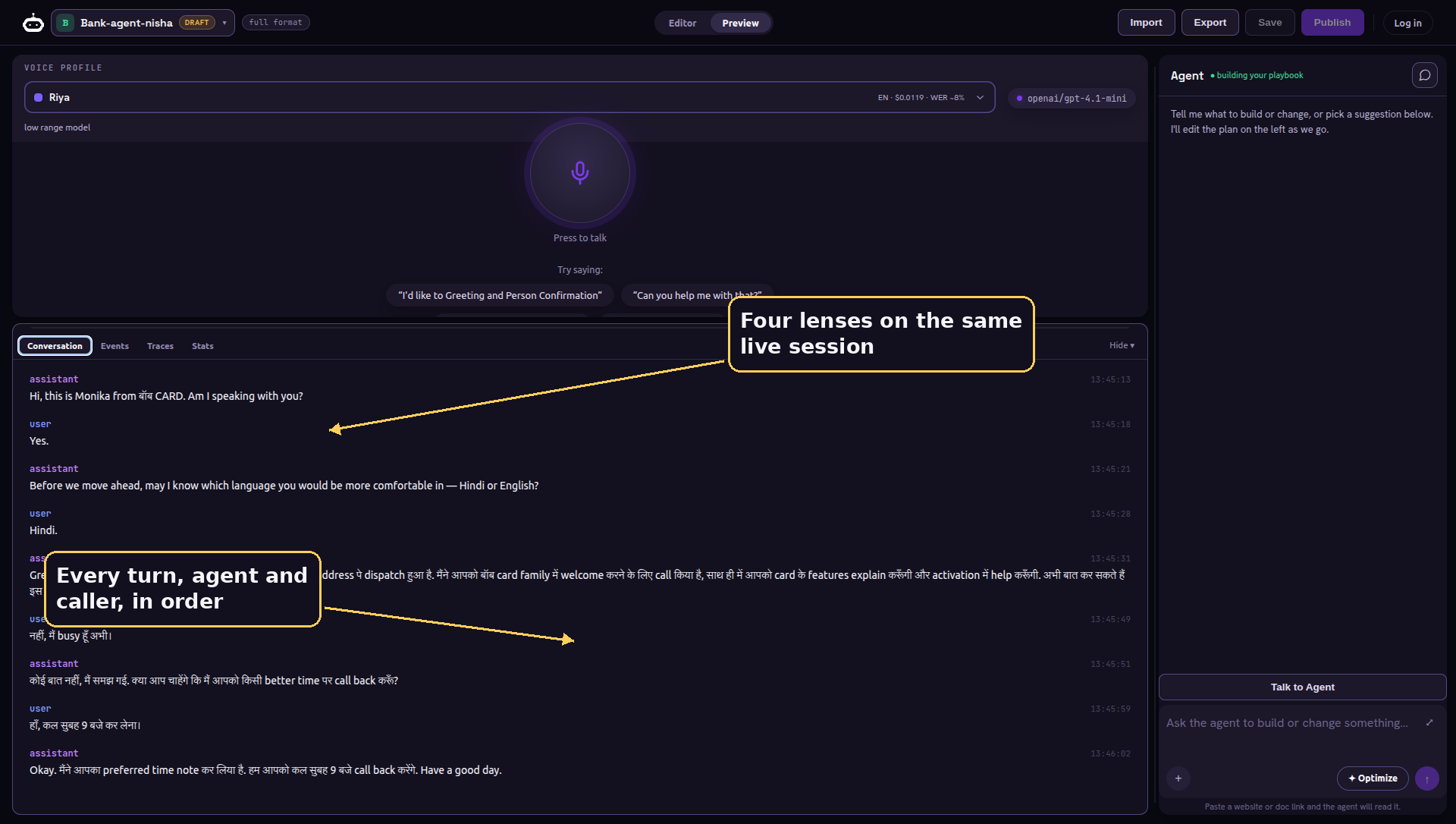
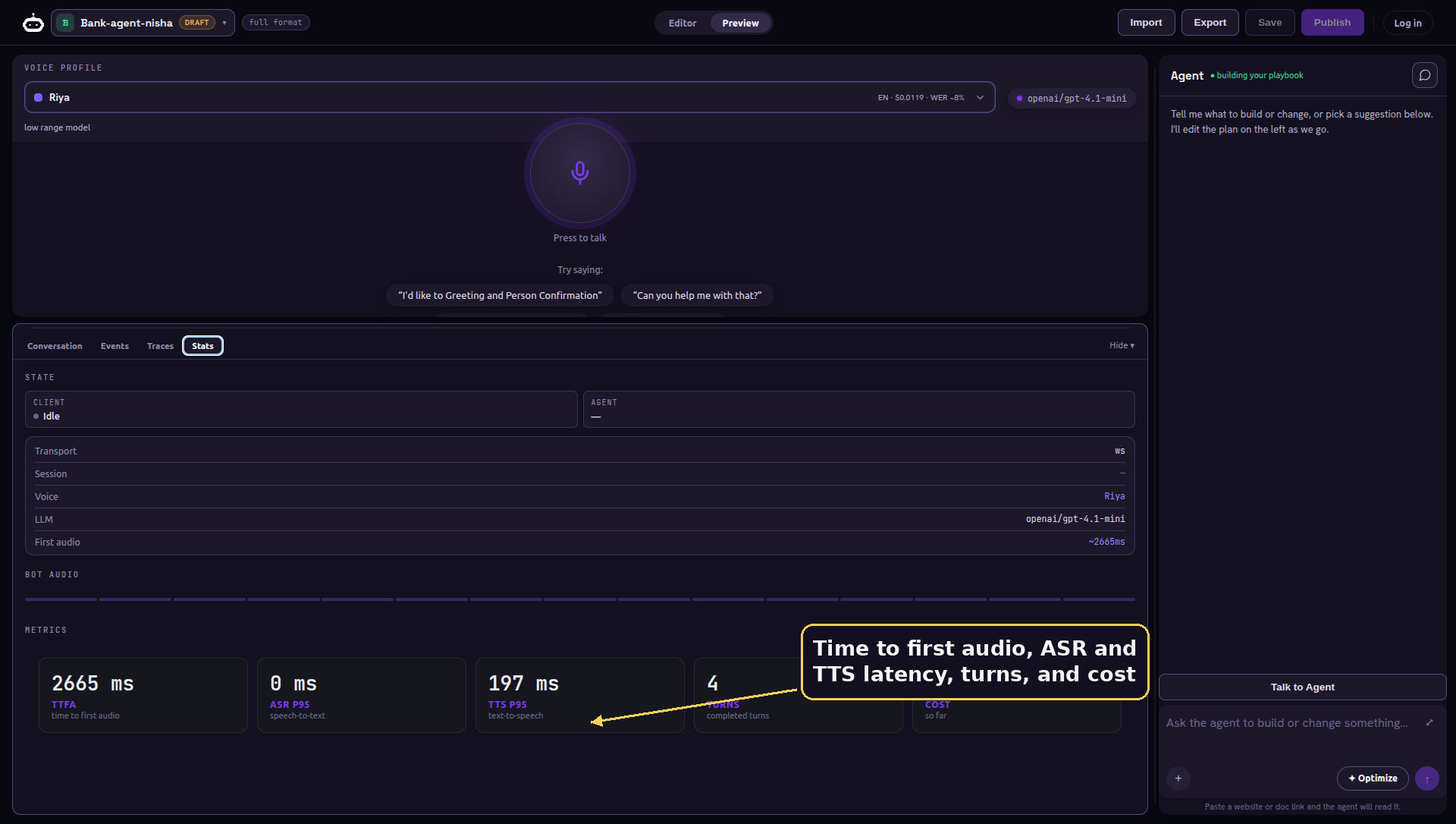
A voice agent that you cannot see inside is impossible to debug. So while the call runs, the Playground gives you four lenses on the same live session. The first is the plain transcript, turn by turn, exactly as it happened.
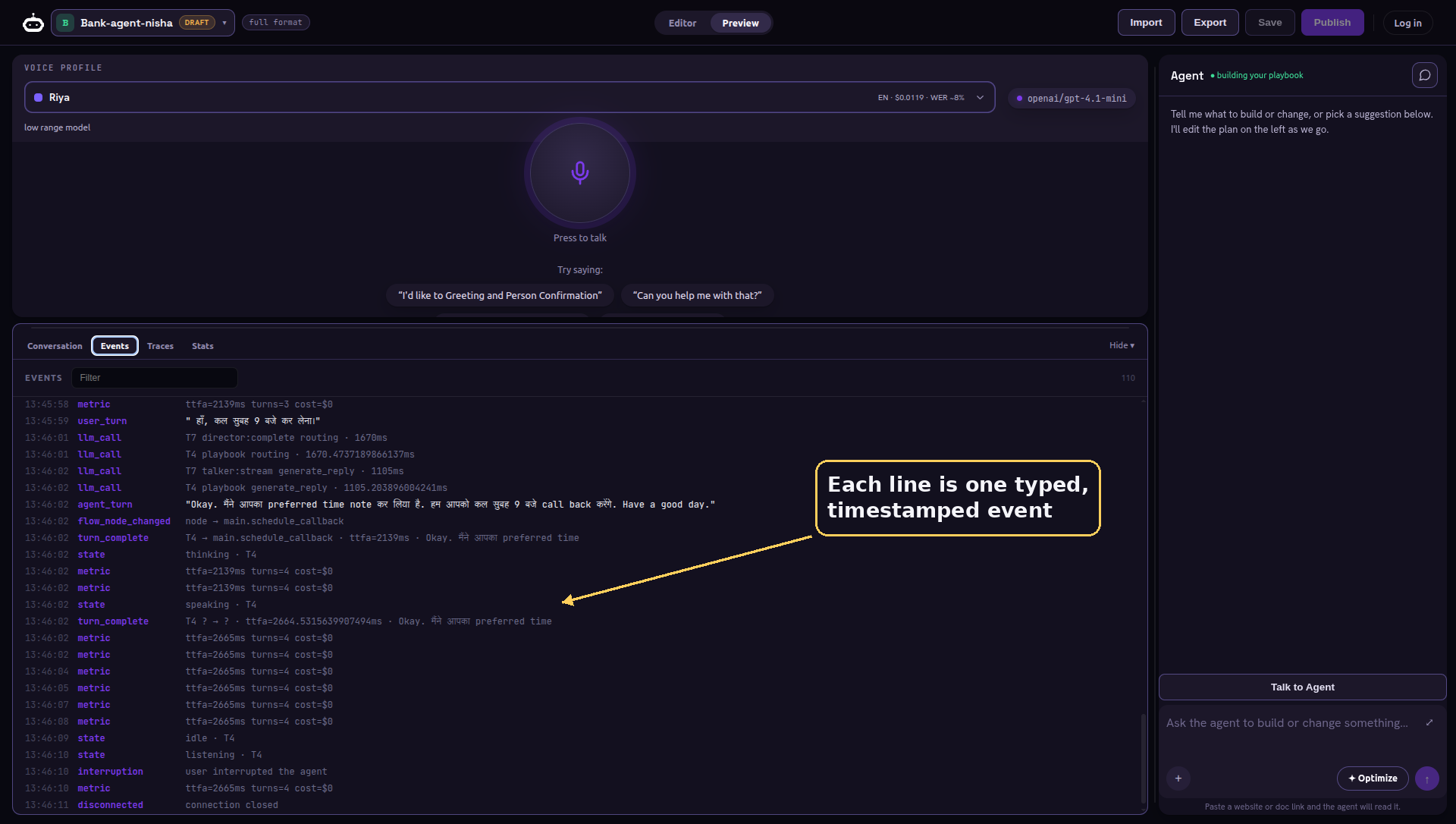
The second is the raw event stream, every typed event the engine emits, shown live. When the agent does something surprising, this is where the reason is. We will see what those events actually are when we open the engine up.
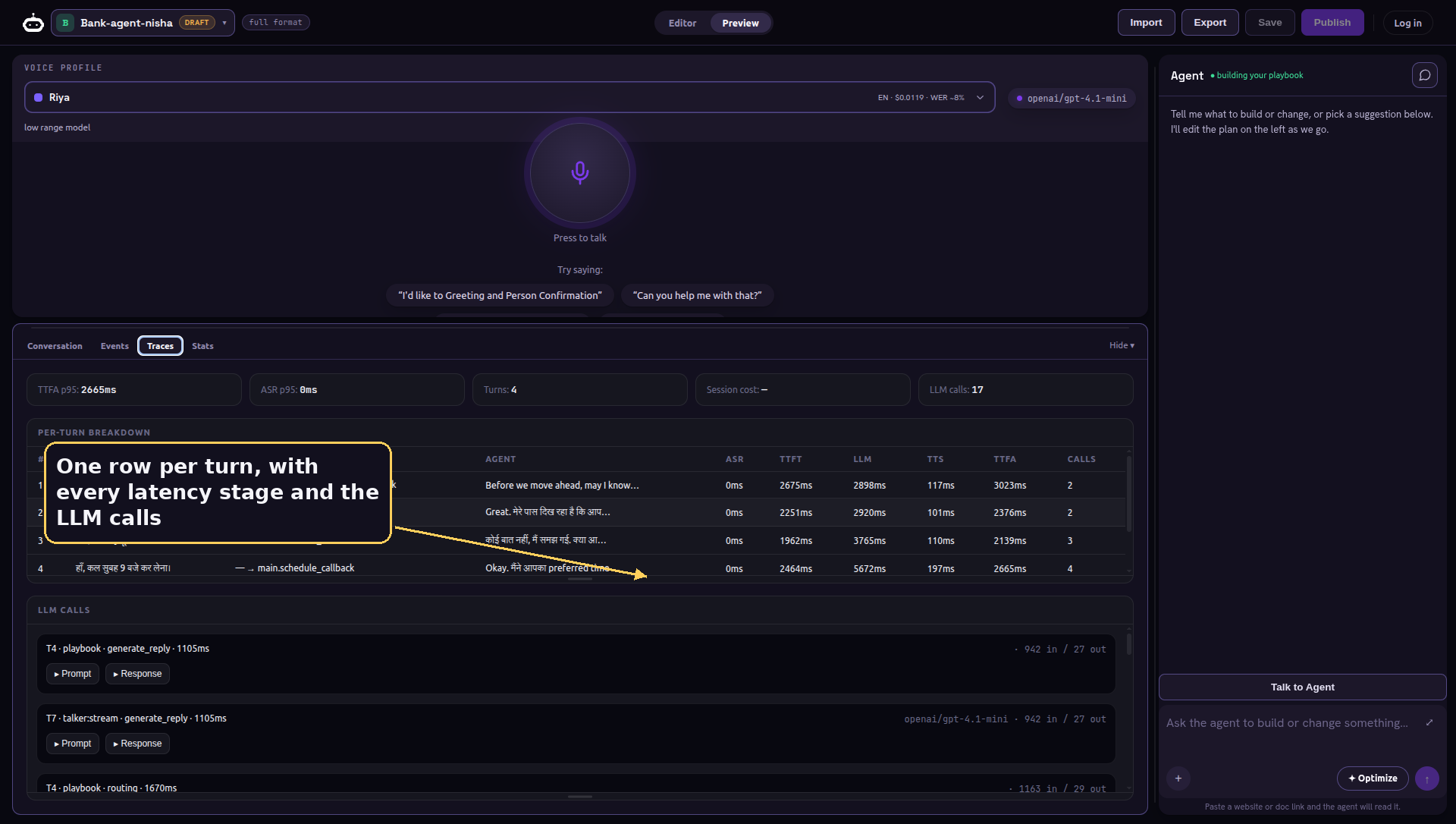
The third breaks the call down turn by turn, with the timing of every stage and the individual model calls behind each turn, tokens and latency included. This is where you find the milliseconds.
The fourth is the live scorecard: time to first audio, speech and transcription latency, completed turns, and the running cost of the call. You watch speed and spend while you iterate, not after.
Step six: let it improve itself
The optimizer
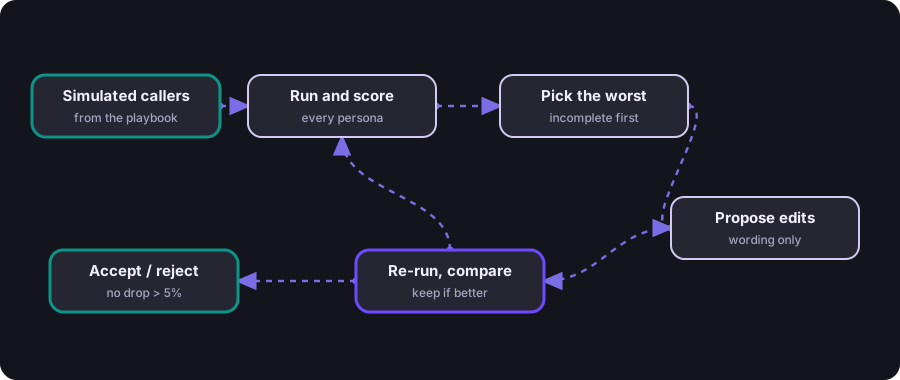
Writing a first draft is easy. Making it good is the work, and the optimizer does that work for you. Ask the co-author to optimize, and it runs a loop driven by simulated callers it generates from your own playbook.
The scoring is not a single vague number. It is a weighted blend of four things that actually matter on a call, and seeing the weights tells you what the optimizer cares about most.
objective = 0.40 * completion rate   (did the conversation finish)
          + 0.30 * slot accuracy     (did it capture the facts correctly)
          + 0.20 * smoothness        (few turns wasted per step)
          + 0.10 * low repair        (rarely re-asked a known answer)
a change is kept only if this total rises AND no single metric drops more than 5%
The selection of what to fix is deliberate too. It does not look at average runs, it goes straight for the worst ones, ranked incomplete first, then inaccurate, then repair heavy, because that is where the wording is failing hardest. It reads those, proposes edits, re-runs, and compares. A candidate is kept only if the total score rises and no single metric regresses by more than five percent, so the optimizer can never quietly trade away completion to chase a prettier number elsewhere. To keep it cheap it runs the evaluation on a smaller, faster model set by an EVAL_LLM setting, separate from the one writing your edits.
Two limits are there on purpose. It only ever rewrites prose, the words the caller hears, never the structure of the conversation, because deciding what steps exist is a judgment that stays with you. And it stops when it stops improving, rather than grinding forever. You can feed it a human written ideal conversation as a target and real call traces as positive examples, and it tunes toward them.
Under the hood
superdialog: two minds, working at once
That is the whole surface: arrive, write, edit by talking, hear it, see inside, tune. None of it would work without the engine doing the real work below the screen. It is open source, it is called superdialog, its code lives on GitHub, and from here on we are below the screen.
Its central idea is that a good voice turn is doing two jobs at once, and those jobs want opposite things. One wants to talk immediately, because silence on a phone call feels broken. The other wants to be careful about what the caller actually said, because getting a date or a card number wrong is worse than being slow. So superdialog runs them as two separate minds, concurrently, on every turn.
A caller stops talking. Two minds wake up at the same instant.
| Talker — the fast path | Director — the careful path |
|---|---|
| Streams the reply token by token, straight to speech | Extracts the structured facts the caller just gave |
| Optimizes for latency; dead air is the enemy | Decides whether to advance to the next step |
| Sees the transcript and the current step guidance | Optimizes for accuracy; takes the time it needs |
▼ on a critical step the Talker waits for the verdict (a hard gate) ▼
The Talker starts streaming a reply the instant the caller stops, sending tokens straight to speech. The Director runs in a shielded background task, pulling out the structured facts and deciding whether to advance. On a casual step the Talker just speaks and the Director catches up quietly. On a critical step, marked as a hard gate, the Talker waits a beat for the Director's verdict before committing, and if the Director is taking too long it says a natural holding phrase rather than going silent. Latency and accuracy stop fighting, because each one gets its own process.
The memory
Every call is an append-only log
superdialog never stores the state of a conversation directly. It stores a log of typed events, and the state is computed by folding that log. A turn spoken, a slot extracted, a step advanced, a tool called, a correction issued: each is a small immutable record appended in order. The current state is always derived, never edited in place.
| Item | What it does |
|---|---|
UtteranceEvent |
a turn in the transcript |
SlotWriteEvent |
a value extracted, with who wrote it and how sure |
AdvanceEvent |
a move from one step to the next, and why |
ToolCallEvent / ToolResultEvent |
an API call and its result |
SteeringNoteEvent |
a correction, for example stop re-asking a known fact |
EnvWriteEvent |
a runtime value written by a tool, like a refreshed token |
DegradedEvent |
the Director failed but the Talker carried on |
SummaryEvent |
an older stretch of the call, compressed |
SessionEndEvent |
a terminal step was reached and an outcome stamped |
This sounds academic until you feel what it buys you. You can serialize the log, move it to another machine, replay it, and land in exactly the same state. Every extracted value carries who wrote it, how confident it was, and which point in the call it came from. When something goes wrong, you do not guess, you read the log. And the Events tab you saw a moment ago is simply this stream, shown live as it happens.
The wiring
Four channels, one tab
Between that engine and your browser, four distinct channels stay in step at once. Together they are why nothing in the Playground ever needs a restart.
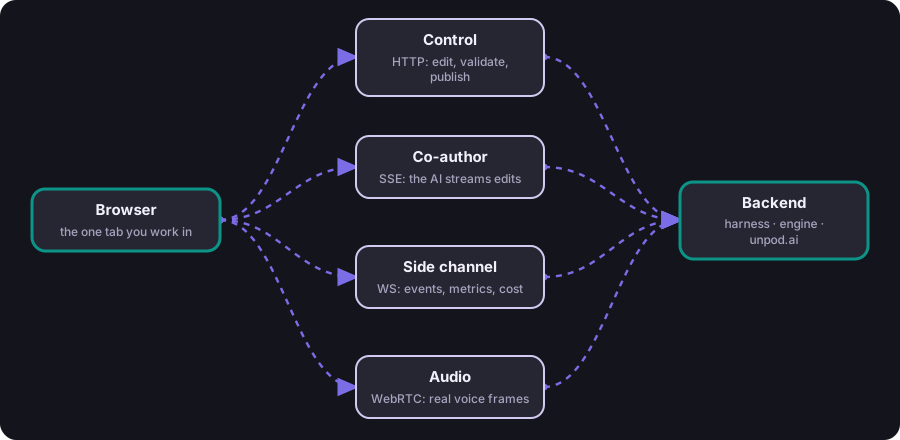
The most important choice hides in the audio row. When you press talk, the agent runs in process, right there in the studio. There is no build, no artifact, no deploy between editing a line and hearing it spoken. The agent you talk to is the literal text in your editor, unsaved changes and all.
The whole machine, one turn
Follow one turn end to end
Now put every piece together and watch a single turn travel through it, top to bottom. The caller says a few words. The audio becomes text. A turn taking model judges whether they are really done. The text crosses the one seam into the agent. The two minds run at once over your playbook. The decisions land in the log. The reply becomes audio again. And the caller hears it, usually with the first words coming back in well under a second.
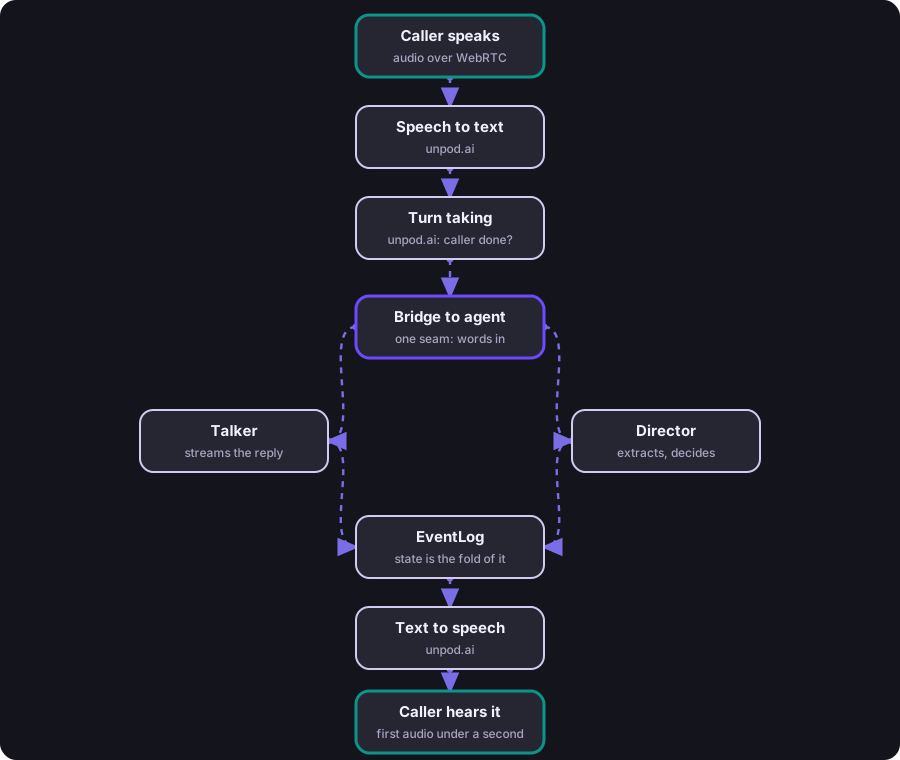
Notice how little of that pipeline the playbook author ever has to think about. You wrote the conversation. The machine handled the microphone, the transcription, the turn detection, the concurrency between speaking and deciding, the recording of state, and the voice. That separation is the entire point, and it is why the same conversation can move to a completely different audio stack without a rewrite.
The reach
It plugs into the stack you already have
Because the engine is pure text in and text out, it does not care what is on either side of it. superdialog ships adapters so the same agent drops into whatever voice stack you run.
| Item | What it does |
|---|---|
LiveKit |
Drops in as a LiveKit LLM; your existing session, audio, and turn taking stay exactly as they were |
Pipecat |
Becomes a processor you place in a Pipecat pipeline |
FastAPI |
Mounts turn, stream, assist, and reset endpoints for a text or HTTP front end |
WebSocket |
A multi-tenant runner: clients send user text, the server streams agent chunks back |
And around the agent, the unpod SDK (quickstart, GitHub) handles the parts every production voice deployment needs but nobody wants to rewrite: the session lifecycle, the lifecycle hooks, per call metrics, observability, and usage and cost accounting wired straight to the model calls the agent makes. The Playground is built on exactly these two pieces, which means anything you build in it runs the same way in production.
Why it matters
What this changes
Most voice agent tooling treats the conversation as a prompt living inside the audio pipeline. That one decision is the root of the slow loop, the un-testability, and the agents nobody can safely change. Separating the conversation from the audio is not a cosmetic refactor. It changes what is possible.
| The usual way | This way |
|---|---|
| Conversation logic lives inside the audio stack. Every change touches the whole system. The only test is a human voice on a live call. Tuning is guesswork. Nobody wants to edit it later. | Conversation is readable text with one clean seam to audio. You test it without a phone, an AI edits it for you, a loop tunes it against simulated callers, and the same artifact runs in any voice stack. |
This matters for any voice AI platform, not only ours. The moment the conversation becomes a first class, readable, testable artifact, the whole discipline speeds up. You can put an IDE around it. You can let a model improve it. You can hold it to a metric. You can hand it to the next engineer. None of that is reachable while the dialogue is trapped inside the pipeline.
The end of the loop
Back to where we started
Think back to the loop we opened with. Edit a sentence, restart the stack, dial in, speak, wait, listen, and do it all again. That loop was never really about the conversation. It was the tax we paid for keeping the conversation in the wrong place.
So we moved it. The conversation became a readable artifact with a single clean seam to the audio, running on an engine with two minds and a memory you can replay, inside a studio where you write, talk, watch, and tune without ever leaving the tab. The restart is gone. The phone as the only test is gone. The guesswork is gone. What is left is the part that was always the real work, deciding what the agent should say.
Building a voice agent finally feels like building software, not performing a soundcheck.
That is how we built it. Everything underneath is open, so the fastest thing you can do next is go and build your own.
Try it yourself